Is Your Website Ready for AI Search? What AEO Means for Contractors
Some homeowners now ask AI tools who to call instead of scrolling search results. Here is what answer engine optimization (AEO) means for a trades business, why it builds on SEO instead of replacing it, and seven checks that help AI tools read and understand your website.
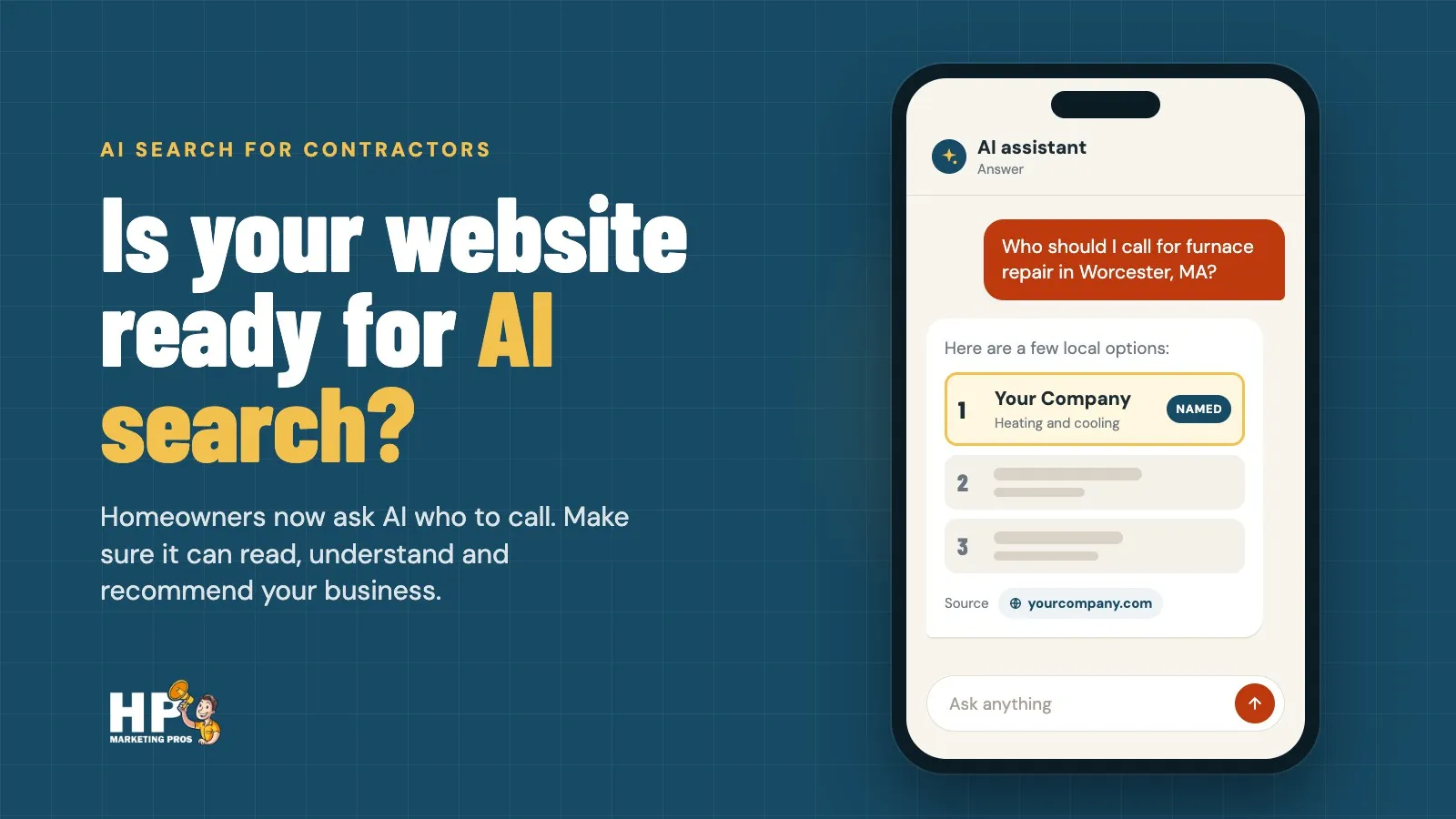
A homeowner's furnace quits on a Sunday night. Five years ago they would have typed "furnace repair near me" into Google and scrolled. Today, some of them ask ChatGPT, Google's AI Overviews, Perplexity or Gemini instead: "Who should I call for furnace repair in Worcester?" They often get a short answer with a few names in it.
Most people only need a plumber, roofer or HVAC company now and then, and when they do, they want one good answer fast. If your business is not one of those names, you may not get a look at that job. That is what answer engine optimization (AEO) is about.
What Is AEO?
Answer engine optimization is making your website easy for AI tools to read, understand and recommend. Traditional SEO tries to get your page ranked in a list of links. AEO tries to get your business named in the answer itself.
The difference matters because an AI answer often names only a few businesses, so there are fewer spots than on a page of search results.
Is SEO Dead? No. AEO Builds on It.
You will hear people say "SEO is over, it is all AEO now." That is not quite right. Google says its AI features draw on the same search index as its regular results, and the basics good SEO has always rewarded still count: a clear, fast, trustworthy website with real information about real services in real towns.
What changes is who is reading your site. It is no longer only Google's crawler and a human visitor. It is also AI tools that read your pages to work out what your business does and where it works. A site can look great to a person and still be hard for those tools to read.
So think of it this way: SEO is the foundation, and AEO is making sure the new readers can use it.
7 Checks for an AI-Ready Website
1. AI Crawlers Are Allowed In
Your site has a file called robots.txt that tells crawlers what they may read. Each AI company runs its own crawlers. OAI-SearchBot feeds ChatGPT search, Claude-SearchBot feeds Claude, and PerplexityBot feeds Perplexity. GPTBot and ClaudeBot collect pages for training AI models, so blocking those two is a choice some owners make on purpose. Blocking the search crawlers is different: OpenAI, for example, says sites that block OAI-SearchBot will not be shown in ChatGPT search answers.
Some sites block these crawlers without the owner realizing it, for example through a hosting or security service such as Cloudflare, which now asks new sites whether to allow AI crawlers.
Check: open yoursite.com/robots.txt. Look for a "User-agent" line with one of those names followed by "Disallow: /", and also for "User-agent: *" followed by "Disallow: /", which blocks every crawler. If your site uses Cloudflare, also check its AI crawler settings, because a block there does not show up in robots.txt.
2. Your Words Are in the Page, Not Hidden Behind Scripts
Many websites build their text with JavaScript after the page loads. Browsers handle that fine. Many AI crawlers read the raw page instead, and on those sites they find little or no text.
Check: in Chrome, right-click your page and choose "View page source". If you cannot find your headline and service descriptions in there, many AI tools may not find them either.
3. Structured Data States the Facts
Structured data (schema markup) is a small block of code that states your business name, phone number, address, service area and hours in a format machines can read without guessing. It can also list your services and the questions on your FAQ section. Google says this markup is not required to appear in its AI features, but it removes guesswork for any tool that reads it.
Check: paste your homepage address into Google's Rich Results Test to see your business markup, and into the Schema Markup Validator (validator.schema.org) to see everything else, including service and FAQ markup.
4. Pages That Answer Real Questions
AI tools are built to answer questions, so a page that answers them clearly is easier for them to use. "How much does a heat pump cost to install?" "Do you service my town?" "Are you available for emergencies?" A page with one clear main heading, a list of your services, the towns you serve and a visible FAQ section gives them the facts they look for.
5. Your Business Identity Is Consistent
Your name, phone number and address should be the same on your website, in your markup and on your Google Business Profile. Make your phone number a tap-to-call link on mobile. Mixed-up details make it harder for any system to be confident about who you are.
6. Technical Basics Are in Place
Secure HTTPS (with the plain HTTP address redirecting to it), an XML sitemap, a clear page title and description, a mobile-friendly layout and a canonical address on each page. None of this is new, and since Google's AI features use the same search index as regular results, these basics still count.
7. Your Site Scores Well in Google Lighthouse
Google Lighthouse scores your site's speed, SEO basics, accessibility and best practices on a phone. A slow or broken mobile site loses customers before they ever call, and it is one of the first things a visitor notices.
Check: run your homepage through pagespeed.web.dev and look at the mobile scores.
The good news: none of this needs a new website, and you can check most of it yourself in an afternoon.
Frequently Asked Questions
What is the difference between SEO and AEO?
SEO works to get your pages ranked in search results. AEO works to get your business named inside AI answers. AEO builds on good SEO rather than replacing it.
Do I need special code for Google's AI Overviews?
No. Google says there are no extra requirements or special markup to appear in its AI features. Your page needs to be indexed and eligible to show in Google Search.
Can I tell if AI tools are recommending my business?
Ask them. Try ChatGPT, Gemini and Perplexity with the questions your customers ask, like "best roofer in [your town]". Answers change over time and from person to person, so treat it as a spot check, not a ranking.
Do I need a new website to be AI-ready?
Usually not. Many of the fixes above are settings, markup and content changes on the site you already have. A site built entirely on JavaScript may need more work.
What is llms.txt?
It is a newer, optional file that gives AI tools a plain summary of your site. It is still a proposal, and Google says its search does not use it, so treat it as a small extra, not a fix. It is quick to add.
Find Out Where Your Website Stands
We built a free tool that checks all seven areas above on your own website. You get a score out of 100, every check explained in plain English with how to fix it, and a comparison with up to three competitors, either ones you name or local ones we find, emailed to you as a PDF within 24 hours. It checks what AI tools can read on your site today. It does not measure where you rank, because AI tools do not publish how they choose which businesses to mention.

HP Marketing Pros
Practical marketing guidance from a team with decades of experience in and around trades businesses.
Need a hand with this?
Want us to handle this stuff for you?
Stop worrying about marketing and focus on what you do best: running your business.
Let's TalkKeep reading